RTM Toolbar · Free · MT4 and MT5
The two marks, one click each.
A free, lightweight chart tool for MetaTrader 4 and MetaTrader 5. It puts a small toolbar in the corner of your chart so you can drop RTM-style boxes and lines in the right colours with one click, and it marks every chart with the pair, timeframe and the RTM Academy watermark.
Download
Free · No registration · MT4 + MT5 in one download
Contains RTM_Toolbar.ex4 for MetaTrader 4 and RTM_Toolbar.ex5 for MetaTrader 5.
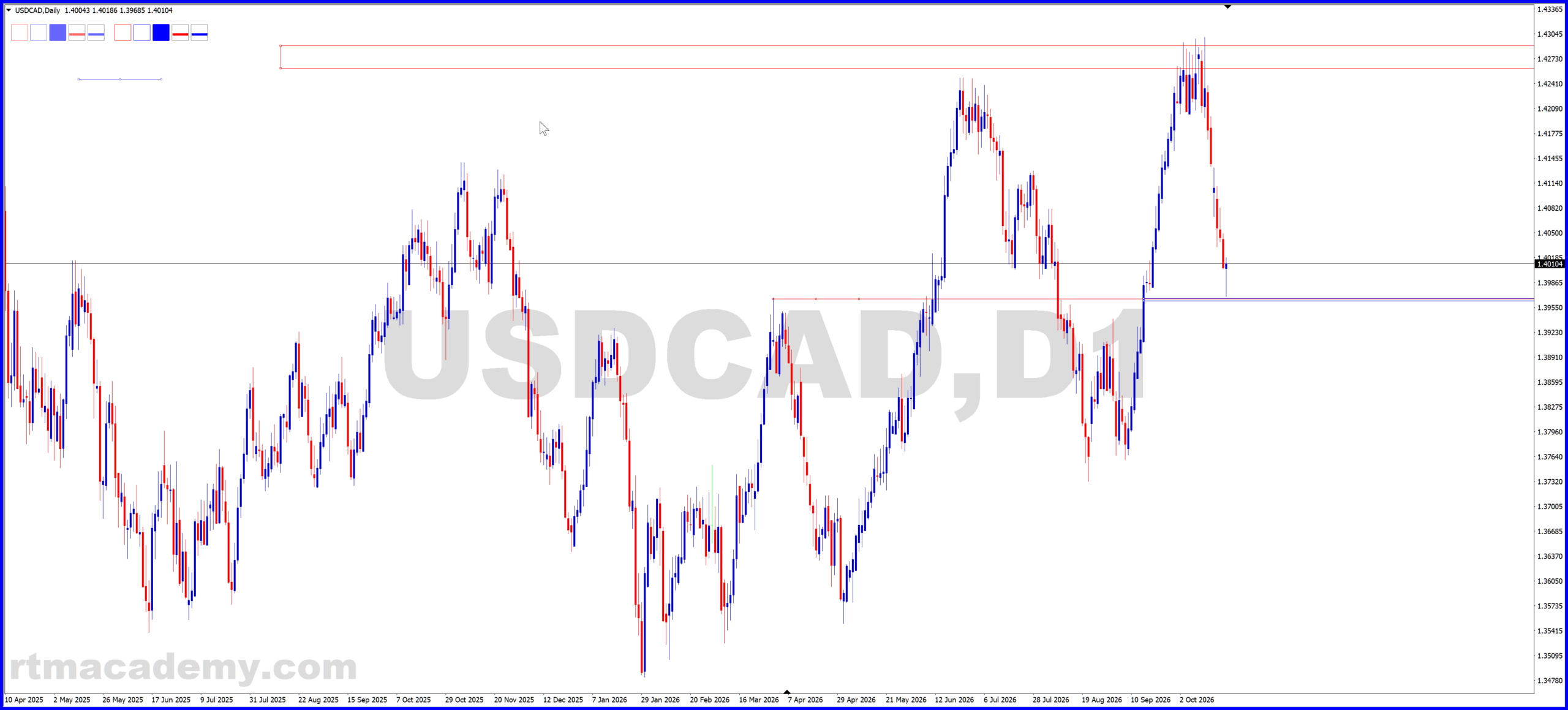
Toolbar top-left, pair and timeframe in the centre, watermark bottom-left. Click to see it full size.
Install
- Unzip the download.
- In MetaTrader, go to File → Open Data Folder.
- Copy
RTM_Toolbar.ex4intoMQL4\Indicators(MT4) orRTM_Toolbar.ex5intoMQL5\Indicators(MT5). - Back in MetaTrader, right-click Indicators in the Navigator panel and choose Refresh, or restart the platform.
- Drag RTM_Toolbar onto any chart. It needs no DLLs and no trading permissions.
What it does
- Toolbar (top-left): two groups of five buttons — three boxes and two lines each. Click a button and the object appears just below the toolbar, already selected, so you can drag it straight to where it belongs.
- Left group drops lighter-coloured objects that stop where you leave them. Right group drops full-colour objects that extend to the right edge of the chart.
- Boxes: red outline, blue outline, blue filled. Lines: red and blue, always horizontal. If you drag one end of a line, the other end follows, so a line can never tilt.
- Pair and timeframe are shown in large grey text in the centre of the chart, and the rtmacademy.com watermark sits bottom-left, so screenshots are always labelled.
- Removing the indicator removes the toolbar and labels only — everything you drew stays on the chart.
Settings
Open the indicator’s properties (right-click the chart → Indicators List → RTM_Toolbar → Edit) to change:
- UI scale — set to 2.0 on a 4K monitor to double the size of the toolbar and dropped objects. The centre title and watermark are not scaled.
- Colours for each box and line, and whether each box is filled.
- Lighten % for the left group and how far (in days) the right group extends.
- Drop size — the starting width and height of boxes and length of lines, in pixels.
Works on MT4 build 600 or later and any current MT5. This is a drawing aid only. It places nothing in the market and makes no trading decisions.
 English (UK)
  Deutsch
  Español
  العربية
  Bahasa Indonesia